Software by Mike Robinson   
Egg Timer
A simple countdown timer

Download     DownloadDownload     HomeHome     PurchasePurchase    

Download       Download

What is this Egg Timer thing?

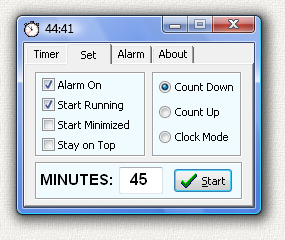
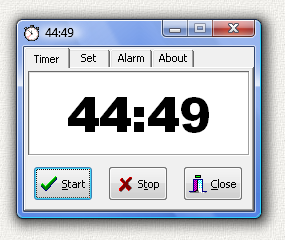
EggTimer is a simple timer that is sort of like the cooking timer you might find in many kitchens.  You set a time in minutes, it counts down the time, and an alarm goes off when the time has elapsed.  

It starts with the counter running.  It remembers the number of minutes to count from the last time it was run.  It can start minimized and you can see the counter running in the minimized icon on the task bar.  When the alarm goes off, it restores itself to the screen and flashes a few times. Just click close and it is gone.  Just 2 clicks.  One to start, one to close. Very simple.

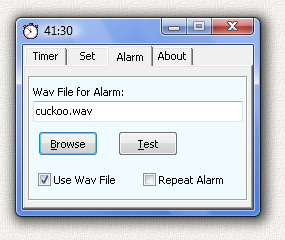
It has a couple more bells and whistles.  It can play any .WAV file as the alarm.  It can count down or up.  It can count from 0 to 9999 minutes.  To keep things simple, the count time is entered in whole number minutes.  Most egg timers work this way.  It can also be run in clock mode where it will show the time of day instead of running the timer.

I shipped EggTimer with a few sample .WAV files.  You can probably find quite a few more in your C:\WINDOWS\MEDIA directory.  EggTimer has a popup dialog window to select the file and a test button to preview the sound.

This is a 32 bit program and will run on Windows ME, NT, 2000, XP, and Vista.

See the bottom of this page if you would like to purchase Egg Timer for just $5 (Five Dollars). The program works fine even if you do not pay for it. There is no time limit. It will run forever. It is fully functional. No features have been removed. It contains no spyware, no advertising.

Settings

When Eggtimer closes it remembers all of its settings by saving them in a text file EGGTIMER.INI which it creates and maintains in the same directory where EGGTIMER.EXE is located.  This is fully automatic, but you can also edit this file with a text editor.  Here is a sample EGGTIMER.INI file:

[SETTINGS]
WINDOW TOP=280
WINDOW LEFT=367
START RUNNING=YES
START MINIMIZED=YES
COUNT DOWN=YES
CLOCK MODE=NO
START TIME=30
USE WAV FILE=YES
WAV FILE=C:\Program Files\eggtimer\cuckoo.wav
STAY ON TOP=NO
REPEATALARM=NO

EggTimer will create this file the first time it closes.  The WINDOW TOP and WINDOW LEFT are the location of the window in pixels.

Install

Run EGGTIMER-SETUP.EXE to install the program. This will create a folder, copy all the files to the folder, and create shortcuts on the desktop and the start menu. An alternate install method is to download the executable file EGGTIMER.EXE. Then just run the program. If you use this method, then to uninstall simply delete the files.

UnInstall

Open Windows Control Panel, select Add Remove Programs, select Egg Timer in the list of programs, and click OK. The uninstall program will then run and remove the program. If you installed the program manually then delete the files to uninstall the program. EggTimer does NOT alter the Windows Registry or any other system settings.  It only creates and maintains the EGGTIMER.INI file in the same directory as the EGGTIMER.EXE file.

Legal Stuff

This program is Copyright © 1999 Michael Robinson.  All Rights Reserved.  Use this program at your own risk.  No guarantees of any sort.  You may give this file away free, but you may not sell it.  It must be distributed as a package along with all files.  Modification of the executable file is prohibited.

Revision History

1.0.0.0  Aug  8, 1999   Initial Public Release.
1.0.0.1  Aug 15, 1999   Added clock mode.
1.0.0.2  Aug 15, 1999   Clock mode now 12 hour A/P format.
1.0.1.0  Jul 19, 2003   Added help.
1.1.0.0  Mar  4, 2007   Updated for Windows Vista.
1.2.0.0  Mar 31, 2007   Updated for Windows Vista.
2.0.0.0  Apr  3, 2007   Updated for Windows Vista.


Purchase    

The program works fine even if you do not pay for it. There is no time limit. It will run forever. It is fully functional. No features have been removed. It contains no spyware, no advertising.

The purchase price is $5.00 (Five US Dollars). I accept major credit cards, PayPal , or personal checks. Pay once and all future upgrades are free.

Pay with credit card or PayPal Pay with credit card or PayPal Or send payment by PayPal to: ElegantPie@HotMail.com

Or send personal check or money order payable to Michael Robinson

Michael Robinson
PO  Box  95
Shelton,  CT  06484

Please add $10.00 if you would like a CD sent by US Mail to an address in the USA.
Please add $20.00 if you would like a CD sent by US Mail to an address outside the USA.


DOWNLOAD       PURCHASE    HOME    EMAIL   


elegantpie@hotmail.com

http://www.elegantpie.com