Old serial numbers will not work with this new version. If you paid for this program in the past, just email me ( elegantpie@hotmail.com ) and I'll send you a new free serial number. Pay once, future upgrades are free. The install program will overwrite any previous version so you are not required to uninstall older versions.
All programs run fine in Windows XP, Vista, Windows 7, 8, 10, and Windows 11. For 32-bit or 64-bit systems.
Dec 11, 2011 - DriveInventory 1.3 can make million-line Excel 2007 files.
Get a Useful Screensaver
 Download
Info
Purchase
Download
Info
Purchase
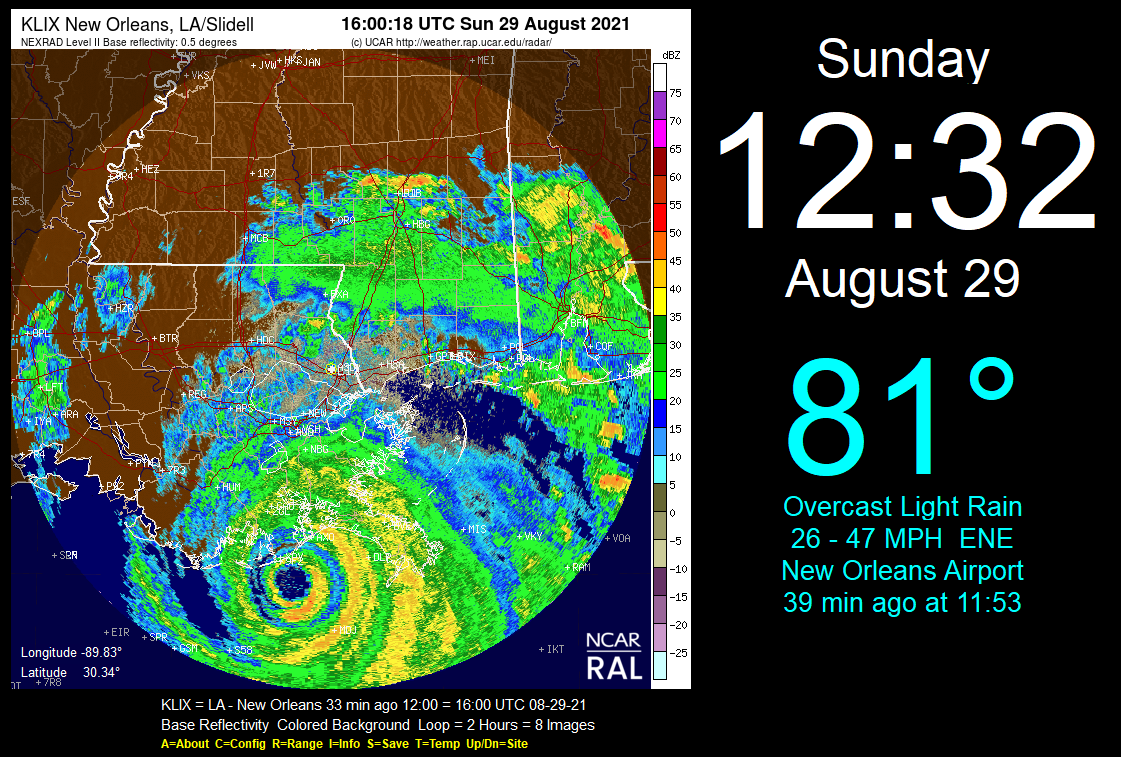
WeatherSaver is a screensaver that shows current
NEXRAD
animated radar map, air temperature, weather conditions, wind speed, time, and date. These are downloaded from the internet every 6 minutes. Radar maps are available for any location in the USA including Alaska and Hawaii. The temperature and weather conditions text are available for any location in the world.
You can choose from 2 radar sources: NCAR or NWS. The NCAR radar is shown above. The radar can be shown animated or static. You can select one of 3 radar types: Composite Reflectivity, Base Reflectivity, or Velocity. Choose a color background, a gray background, or a black background. The time, temperature, and weather conditions can be turned on or off. If you turn off the time and temperature, then just the radar screen will be shown. The time can be customized to show the seconds, time only, AM/PM, or 24-hour time. The text colors can also be customized.
It installs both as a normal program and a real screensaver with password ability and preview in the small Windows screensaver setup screen. To exit the program just press any key, click the mouse, or move the mouse.
This is a 32-bit program and will run on Windows ME, NT, 2000, XP, Vista, Windows 7, 8, 10, and Windows 11. It also runs fine on 64-bit systems.
This trial version will operate for 14 days. If you purchase the program for $20.00 (Twenty US Dollars) If you purchase the program, I will send you a serial number that will that will enable continued operation with no time limit. You can pay by PayPal or mail a check. If you purchase this program and are not satisfied with it for any reason, I will refund your money. Pay once and all future upgrades are free.
This demo version is fully functional. No features have been removed. It contains no nag screens, no spyware, no advertising.
Turn your expensive PC into a cheap clock
Download
Info
Purchase
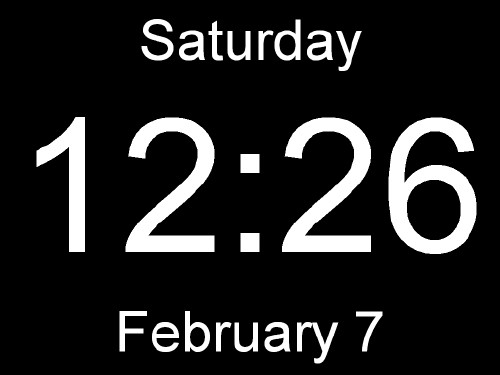
This is a very large digital clock screensaver. The black background covers everything including the task bar on the bottom. It has no frame so there are no borders. It shows the time, date, and day of the week. That is all it does. Just a clock. But it is a huge clock man. To exit the program just press any key, click the mouse, or move the mouse. It installs both as a normal program and a real screensaver with password ability and preview in the small Windows screensaver setup screen. The display can be customized to show the time only, AM/PM, or 24-hour time. The display fonts, font size, and colors can also be changed. The day, date, and seconds display can be turned on or off.
My other name for this program is "The Thousand Dollar Clock" because it turns your expensive computer into a cheap clock.
This is a 32-bit program and will run on Windows ME, NT, 2000, XP, Vista, Windows 7, 8, 10, and Windows 11. It also runs fine on 64-bit systems.
If you purchase the program for $10.00 (Ten US Dollars) I will send you a serial number by email that will remove the nag screen that is displayed when the program exits. You can pay by PayPal or mail a check. If you purchase this program and are not satisfied with it for any reason, I will refund your money. Pay once and all future upgrades are free.
The program works fine even if you do not pay for it. There is no time limit. It will run forever. It is fully functional. No features have been removed. It contains no spyware, no advertising.
Make an Excel spreadsheet of all your files
Download
Info
Purchase
Drive Inventory makes an
Excel spreadsheet
of all the files on your hard drive. The Excel file can have up to
1,048,576 rows
in Excel 2007 or later. In Excel 2003 and earlier the limit is 65,536 rows. If these limits are exceeded, then additional worksheets will be added so that all files are included.
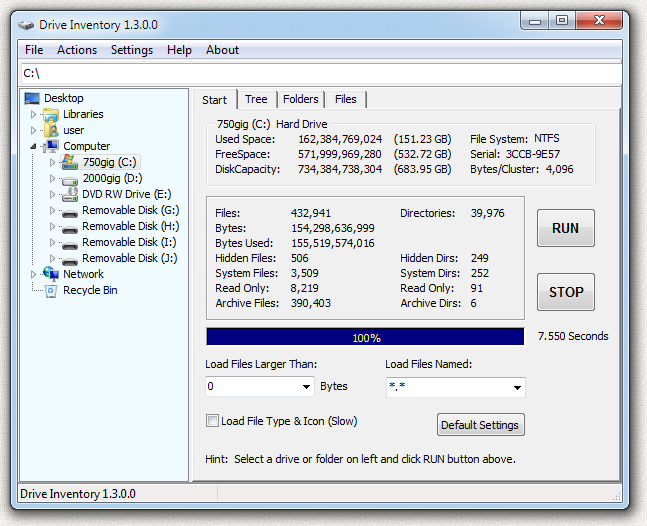
Fast, fast, fast. Drive Inventory is very fast. In the image above you can see 433,000 files were loaded in less than 8 seconds. This speed is possible because the files were cached in memory. The first run was slower as the files were read from the slow hard drive. This example shows that the overhead of the program operation adds less than 8 seconds. It takes only 8 seconds to load these files into 3 separate tree structures: files only, folders only, and full tree. About one million files were added to these trees in seconds. I think Drive Inventory is the fastest program of this type in the world.
You can also put the list into a web page, a text file, a rich text file, or an image file (JPG, GIF, or BMP). You can inventory a whole drive or just one folder. Sort the entire list in seconds. Sort by date to find your oldest files or sort by file attribute to find all your hidden or system files. Use a file mask such as *.jpg to find all your photos. Use size limits to find files larger than 1 megabyte or any limit you choose.
Get detailed information about each file or folder, change attributes, open it, or delete it. Folders will open in Windows Explorer and files will open in the default program for that file type. You can also view the file contents, search for files, rename files, or do a batch rename of all selected files.
There are 3 tabs: one for a complete file tree, one for files only, and one for folders only. Grab the headings and move the columns around to any order. Right-click on the headings to add or remove columns.
This is a 32-bit program and will run on Windows ME, NT, 2000, XP, Vista, Windows 7, 8, 10, and Windows 11. It also runs fine on 64-bit systems.
The price of this program is just $20.00 (Twenty) US Dollars. You can pay by PayPal or mail a check. If you purchase this program and are not satisfied with it for any reason, I will refund your money. Pay once and all future upgrades are free.
This trial version will operate for 14 days. If you purchase the program, I will send you a serial number by email that will enable continued operation with no time limit. Your serial number will work with all future versions. This demo version is fully functional. No features have been removed. It contains no nag screens, no spyware, no advertising.
Check The Contents of a File
Download
Info
Donate
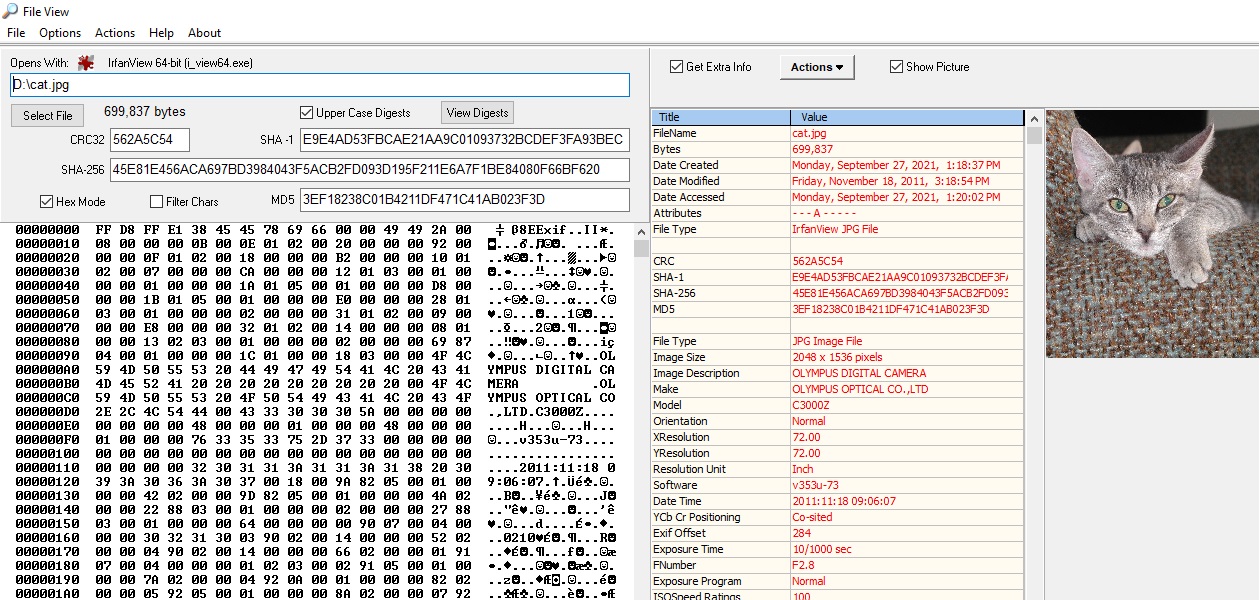
If you are in Windows Explorer just select the file and right click and use the "Send To" and then select "FileView" as shown here:
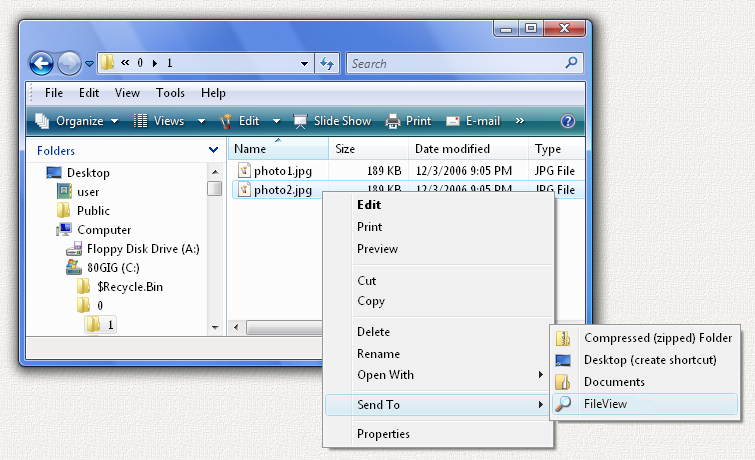
It pops up the information screen shown above. It does this without leaving Windows Explorer.
You can also run FileView as a stand-alone program from the FileView desktop shortcut and it will allow you to select the file to view.
FileView can read the basic information such as size and date of any file type. If you click the "Get Extra Info" checkbox the program will display all of the unique extra information in the file header for that particular file type. It can read extra information for these types: ANI, ARJ, AVI, BMP, CAB, CUR, EXE, GIF, ICO, JPG, JPEG, MP3, PCX, PNG, SCR, TTF, TXT, WAV, ZIP.
This is a 32-bit program and will run on Windows ME, NT, 2000, XP, Vista, Windows 7, 8, 10, and Windows 11. It also runs fine on 64-bit systems.
This program is free, but a $10.00 donation is requested. You can pay with PayPal or mail a check. PayPal also allows you to use a credit card even if you have no PayPal account.
The program works fine even if you do not pay for it. There is no time limit. It will run forever. It is fully functional. No features have been removed. There are no nag screens. It contains no spyware, no advertising.
Clock, Calendar, Weather, Astronomy, and much more!

Download
Info
Purchase
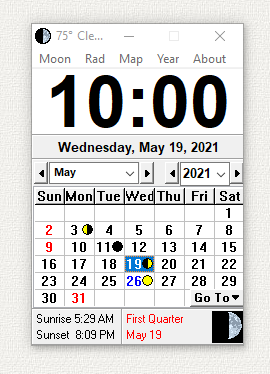
CLICK CLOCK is an award-winning clock, calendar, weather, radar, satellite, and astronomy program. It provides easy access to all sorts of useful information.
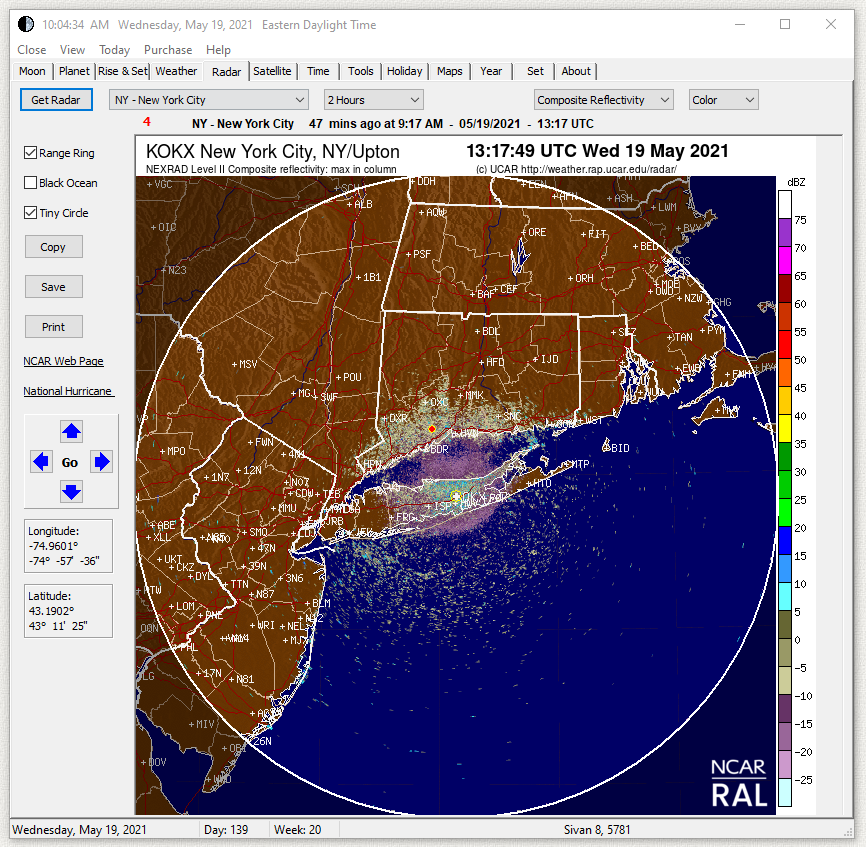
Click Clock shows your local temperature at the top of the clock and in the Windows tray in the lower right desktop.
It also shows local weather, animated weather radar, animated satellite images, date and time of sunrise, sunset, moonrise, moonset, equinoxes & solstices, moon phases, eclipses, meteor showers, daylight saving time, and 27 holidays.
It shows the location of the sun, moon, and all of the planets. It can display this information for any day from the year 1600 to 3429.
It also has links to maps, aerial photos, topographic maps, dictionary, thesaurus, images of the moon, meteor info, Google search, and a calculator.
It displays a picture of the current moon phase in the program, on the task bar, in the tray, and in the window icons. Just click on a day in the calendar and all of the info for that day are calculated and displayed. The images of the moon can be animated to show the changing phases. Even the tray icon can be animated.
It presents positions in the sky as a simple compass position and angle up from the horizon.
The main display is a clock and calendar showing one month but it also contains a calendar screen showing the entire year.
By double-clicking on the program, you can change its size and appearance, hence the name ClickClock. The clock can automatically synchronize the computer clock with any atomic clock time server on the internet.
The astronomy code in ClickClock is extremely accurate. All of the event times, such as sunrise and sunset, are accurate to within 1 minute of values published on the US Naval Observatory web site at https://aa.usno.navy.mil/data/ Click Clock is unique in that the calculation of rise and set times takes into account your altitude above sea level which can change these times by several minutes. It also has a unique graph of sunrise and set times throughout the entire year.
This is a 32-bit program and will run on Windows ME, NT, 2000, XP, Vista, Windows 7, 8, 10, and Windows 11. It also runs fine on 64-bit systems.
This trial version will operate for 14 days. If you purchase the program for $20.00 (Twenty US Dollars) I will send you a serial number by email that will enable continued operation with no time limit. You can pay by PayPal or mail a check. If you purchase this program and are not satisfied with it for any reason, I will refund your money. Pay once and all future upgrades are free. Your serial number will work with all future versions.
This demo version is fully functional. No features have been removed. It contains no nag screens, no spyware, no advertising.
Screen Capture Made Simple
 Download
Info
Purchase
Download
Info
Purchase
Select an area on the screen and instantly pop the captured image into Microsoft PowerPoint, Word, or Excel.
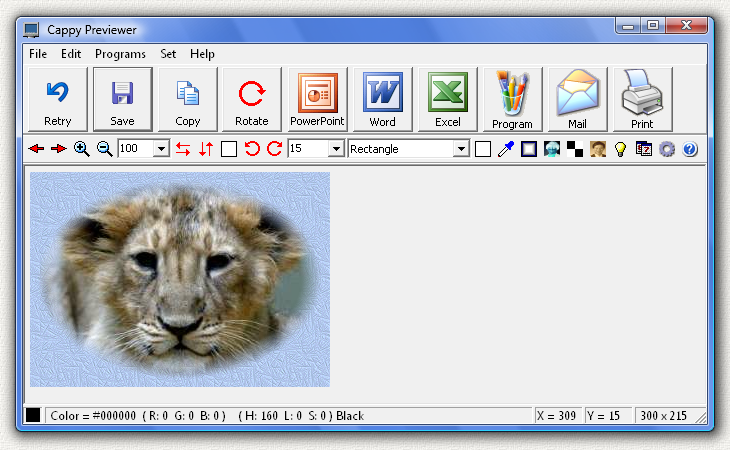
Save the image as a file (BMP, JPG, GIF, PNG), send it by email, print it, copy it to the clipboard, or open it in your image editor or Microsoft Paint. You can capture the entire screen, just the contents of one window, or any one of 10 custom shapes: rectangle, ellipse, circle, square, rounded rectangle, racetrack, triangle, diamond, hexagon, octagon. The image can be rotated to any angle, mirrored, flipped, scaled, color inverted, made black and white. It can be stamped with the date, time, or your name. Many custom backgrounds (32 patterns) are provided and the edges can be blended. You can create nice portraits, like the tiger cub shown above with a blue pattern background and blended edges.
Cappy can capture any image you can get up on the screen. It does not matter which program is displaying the image.
Start the program and it appears as a small icon in the tray on the lower right of your screen. Then setup the screen you want to capture. Then click on the Cappy icon and select "CAPTURE SCREEN" on the menu. Then select the capture area shape. Then click and drag on the screen to select the capture area. Up pops the Previewer screen you see above.
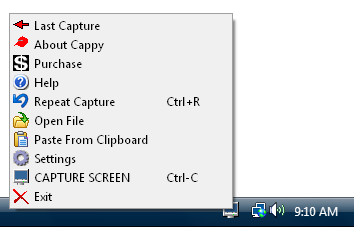
To send the image to PowerPoint, Word, or Excel, you must have these programs installed on your computer. Cappy will automatically create a PowerPoint Slide, or a Word Document, or an Excel Spreadsheet. It will then open the program and show you the captured image. You can then do any of the functions contained in PowerPoint, Word, or Excel. For example, you can add arrows pointing out features in the captured image, or add titles or labels. You can also make more than one capture and they will all be placed in the same document. In PowerPoint each screen capture will appear on a different slide, so you can capture an entire slide show.
Some programs and web pages try to prevent you from copying their graphics. Cappy can still capture the screen even if the print-screen key is disabled. Some programs will not start if a screen capture program is detected as running. The trick here is to get the graphics up on the screen and then start Cappy. Then just capture the screen. Leave Cappy running when you surf the web and you can capture anything you see.
This is a 32-bit program and will run on Windows ME, NT, 2000, XP, Vista, Windows 7, 8, 10, and Windows 11. It also runs fine on 64-bit systems.
This trial version will operate for 14 days. If you purchase the program for $20.00 (Twenty US Dollars) I will send you a serial number by email that will remove this line, enable continued operation with no time limit, and automatically place your name on the PowerPoint slide, Word Document, or Excel Spreadsheet. You can pay by PayPal or mail a check. If you purchase this program and are not satisfied with it for any reason, I will refund your money. Pay once and all future upgrades are free. Your serial number will work with all future versions. It contains no nag screens, no spyware, no advertising.
Select & record image file point coordinates
 Download
Info
Purchase
Download
Info
Purchase
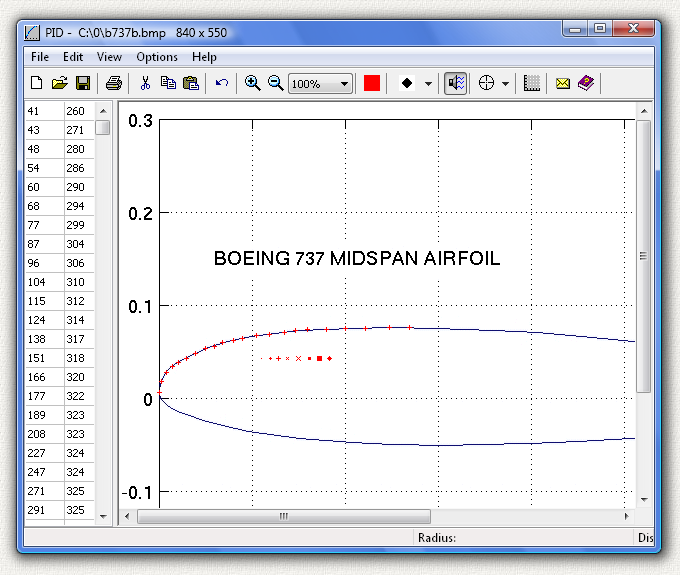
Precision Image Digitizer (PID) is a program for tracing and recording the coordinates of selected points in a graphics image file. It can read in a JPG, GIF, or BMP file and you can then use your mouse to point and click on the points in the image that you would like to record. The coordinates are displayed on the screen as you click them and they can then be exported to an ASCII text file, exported to an AutoCad DXF file, or printed. These files can then be imported into any other program capable of reading in text files or DXF files. You can also use the Windows clipboard to copy and paste images into and out of the program. The point coordinates are measured in pixels from the zero location (0, 0) at the lower left of the image. The horizontal axis is X, the vertical axis is Y. You can assign a scale factor to the coordinates so the numbers on the bottom of the screen are displayed in real units such as inches. Setting the scale factor is very easy. Just click on two points on the image where you know the distance between the points.
This is a 32-bit program and will run on Windows ME, NT, 2000, XP, Vista, Windows 7, 8, 10, and Windows 11. It also runs fine on 64-bit systems.
This is a demo version. It is fully functional except it cannot save or print files. If you purchase this program for $20.00 (Twenty US Dollars) I will send you the fully functional version. You can pay by PayPal or mail a check. If you purchase this program and are not satisfied with it for any reason, I will refund your money. Pay once and all future upgrades are free.
The program works fine even if you do not pay for it. There is no time limit. It will run forever. It contains no nag screens, no spyware, no advertising.
Calculate the percentage of alcohol in your blood after drinking
 Download
Info
Purchase
Download
Info
Purchase
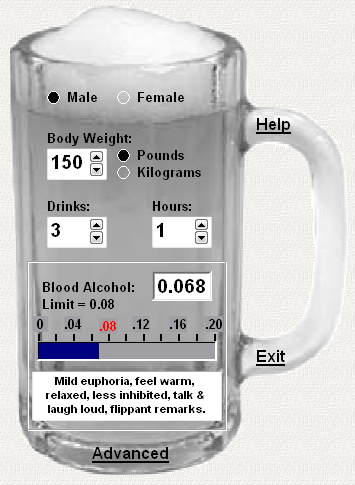
Enter your body weight, gender, number of drinks, and hours drinking and it calculates your blood alcohol level. The Cheers program is in the shape of a beer mug so it looks like a cute toy. It's fun and easy to use. But don't let looks fool you. It contains the very latest biological equations for the absorption and metabolism of alcohol.
The law says don't drink and drive. In most states you can be convicted of drunk driving if your blood alcohol level is over 0.08. But most people have only a vague idea of how drunk they are after a few drinks. Sure, you can feel the effect of the alcohol, but exactly what is your blood alcohol level? This program will calculate your blood alcohol level based on the number of drinks, body weight, gender, and number of hours spent drinking. All of these factors enter into the calculation. A heavier person can drink more than a lighter person and still stay below the legal limit. A man can drink more than a woman and still stay below the limit. A person who spreads their drinking over a few more hours can drink more and still be legal.
I wrote this program for myself but it came out rather nice so I decided to distribute it. One day I was wondering how many drinks I could have and not be drunk in the eyes of the law. I did a lot of research and found the latest methods and equations on the metabolism of alcohol and put them into this program. In my case I can have about 3 beers in an hour and not go over the 0.08 limit. No more guesswork. And if I drink more than my limit, I know I had better get a ride home.
This is a 32-bit program and will run on Windows ME, NT, 2000, XP, Vista, Windows 7, 8, 10, and Windows 11. It also runs fine on 64-bit systems.
This trial version will operate for 14 days. It will give you good estimate of your blood alcohol level based on average values. If you purchase the program for $10.00 (Ten US Dollars) you get a number of advanced features that allow you to fine-tune the calculation to your body type including your height and age. The purchased version also has no time limit. You can pay by PayPal or mail a check and I will send you a serial number to enable all of the advanced features. Click on the word "Advanced" at the bottom of the beer mug to see these. If you purchase this program and are not satisfied with it for any reason, I will refund your money. Pay once and all future upgrades are free. It contains no nag screens, no spyware, no advertising.
Calculate Your Payments, Make an Excel File
Download
Info
Purchase
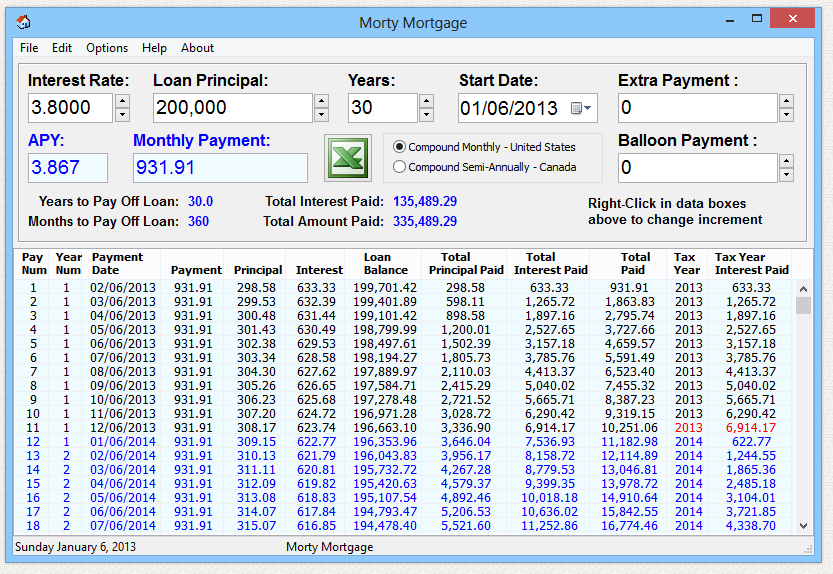
Enter the interest rate, loan amount, number of years, and Morty Mortgage calculates the monthly payment and all the values to the end of the loan. Each payment is broken down into principal and interest, including a running total. The total interest paid in each tax year is also shown in
red
to estimate your tax deduction. Make an excel spreadsheet or save in 9 files types: text, CSV comma delimited, web page, rich text, BMP, JPG, PNG, GIF. Calculate a car loan or any type of fixed-rate loan with monthly payments. A checkbox selects whether the interest is compounded monthly, or semi-annually as done in Canada. If you want to pay off the mortgage faster, you can also enter an extra payment included with each normal payment, or a balloon payment due at the end of the loan. Morty Mortgage is unique in that it can calculate huge loans up to one trillion dollars. The values shown and in the files is also known as an
amortization schedule
. The program saves and restores the loan values and window size/position the next time it is run.
This program will work with any currency type such as Dollars, Euros, Pounds, Yen.
Click the headings and drag the columns around to any order. Right-click on the headings to add or remove columns. Click the edge of a column and drag to adjust the width. Removed columns are made invisible and not included in the saved files. The column arrangement in the saved files is the same as shown on screen. You can use your own standard arrangement to calculate many different mortgages all in the same format. The program saves and restores the column arrangement the next time it is run.
To create Excel files, you must have a copy of Microsoft Excel installed on the computer.
This is a 32-bit program and will run on Windows ME, NT, 2000, XP, Vista, Windows 7, 8, 10, and Windows 11. It also runs fine on 64-bit systems.
This trial version will operate for 14 days. If you purchase the program for $10.00 (Ten US Dollars) I will send you a serial number by email that will enable continued operation with no time limit and remove the exit nag screen. You can pay by PayPal or mail a check. If you purchase this program and are not satisfied with it for any reason, I will refund your money. Pay once and all future upgrades are free. Your serial number will work with all future versions.
This demo version is fully functional. No features have been removed. It contains no nag screens, no spyware, no advertising.
The File Utility That Microsoft Forgot
Download
Info
Purchase
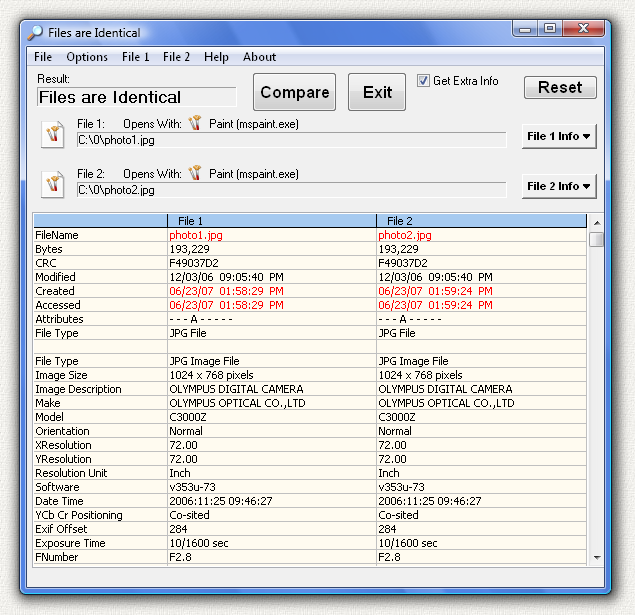
FileCompare compares two files and tells you if even one byte is different. If you are in Windows Explorer just select the file and right click and use the "Send To" and then select "File Compare" to send the file to FileCompare. It compares the files and pops up the information screen shown above. It does this without leaving Windows Explorer. It also shows you all the information about each file. When the first file is selected the program sounds a beep and briefly flashes onscreen but does not appear. This is to let you know the first file was loaded. When the second file is loaded the program appears and shows the comparison. You can also select two files at once in Windows Explorer instead of selecting them individually.
You can also run FileCompare as a stand-alone program from the FileCompare desktop shortcut. In this mode you can compare two files as described above, or get all the information for just one file by selecting the top "File" menu item and then the "Open 1 File" menu item.
FileCompare can read the basic information such as size and date of any file type. If you click the "Get Extra Info" checkbox the program will display all of the unique extra information in the file header for that particular file type. It can read extra information for these types: ANI, ARJ, AVI, BMP, CAB, CUR, EXE, GIF, ICO, JPG, JPEG, MP3, PCX, PNG, SCR, TTF, TXT, WAV, ZIP.
This is a 32-bit program and will run on Windows ME, NT, 2000, XP, Vista, Windows 7, 8, 10, and Windows 11. It also runs fine on 64-bit systems.
The price of this program is just $10.00 (Ten US Dollars). You can pay by PayPal or mail a check. If you purchase this program and are not satisfied with it for any reason, I will refund your money. Pay once and all future upgrades are free.
This trial version will operate for 14 days. If you purchase the program, I will send you a serial number by email that will enable continued operation with no time limit. Your serial number will work with all future versions. This demo version is fully functional. No features have been removed. It contains no nag screens, no spyware, no advertising.
A simple countdown timer
 Download
Info
Purchase
Download
Info
Purchase
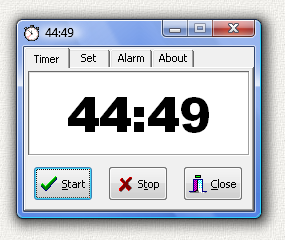
EggTimer is a simple timer that is sort of like the cofineing timer you might find in many kitchens.
You set a time in minutes, it counts down the time, and an alarm goes off when the time has elapsed.
It starts with the counter running. It remembers the number of minutes to count from the last time it was run.
It can start minimized and you can see the counter running in the minimized icon on the task bar.
When the alarm goes off, it restores itself to the screen and flashes a few times.
Just click close and it is gone. Just 2 clicks. One to start, one to close. Very simple.
It has a couple more bells and whistles. It can play any .WAV file as the alarm.
It can count down or up. It can count from 0 to 9999 minutes.
To keep things simple, the count time is entered in whole number minutes.
Most egg timers work this way.
It can also be run in clock mode where it will show the time of day instead of running the timer.
This is one of the first programs I ever wrote. It's simple and useful.
My friend uses Egg Timer to time auctions on eBay. She sets the timer to go off a few minutes before the auction ends so she can sneak in a late bid. I use it to time my laundry so I can get my shirts out of the dryer while they are still warm. Fewer wrinkles if they cool on a hanger instead of cooling all bunched up in the dryer.
This is a 32-bit program and will run on Windows ME, NT, 2000, XP, Vista, Windows 7, 8, 10, and Windows 11. It also runs fine on 64-bit systems.
The price of this program is just $5.00 (Five US Dollars). You can pay by PayPal or mail a check. If you purchase this program and are not satisfied with it for any reason, I will refund your money. Pay once and all future upgrades are free.
The program works fine even if you do not pay for it. There is no time limit. It will run forever. It is fully functional. No features have been removed. It contains no nag screens, no spyware, no advertising.
Send email links to files on your network

Download
Info
Purchase
Why do I need Link Mail?
You want to send a file to someone on your network, but maybe it is too large to send. The file may be named something like this:
G:\path\spreadsheet.xls
But you cannot send this path because the drive letter may not be G on the other computer. So you have to use what are called UNC file names like this:
\\servername\sharename\path\spreadsheet.xls
So, if you know this UNC name you can email this to someone on your network and they can just click on the link above and the file will open on their machine. By sending just the link you can avoid sending large attachments and clogging up email in boxes. LinkMail can help you do this by determining the UNC name. It then automatically opens your email program and places the link in the message. Just pick a recipient and press send. Even if you don't know the UNC name LinkMail does it all for you.
How it works
The first time you run LinkMail it will automatically put a shortcut to itself in your SendTo folder. Then use Windows Explorer to navigate to a file or folder on any networked drive. Select and highlight files or folders. Right click and "Send To" LinkMail and up pops your email program with the links in the message. It works with files or folders. If you send a file link the file will open when the person clicks on the link. If you send a link to a folder then the folder will open. You can combine file links and folder links in the same message. You can send hundreds of links in one email. If the file or folder you select is not on a network drive, then the normal file path with a drive letter is used instead of the UNC Name.
This is a 32-bit program and will run on Windows ME, NT, 2000, XP, Vista, Windows 7, 8, 10, and Windows 11. It also runs fine on 64-bit systems.
If you purchase the program for $5.00 (Five US Dollars) I will send you a serial number by email that will remove the nag screen that is displayed when the program exits. You can pay by PayPal or mail a check. If you purchase this program and are not satisfied with it for any reason, I will refund your money. Pay once and all future upgrades are free.
The program works fine even if you do not pay for it. There is no time limit. It will run forever. It is fully functional. No features have been removed. It contains no spyware, no advertising.
Edit La Cross WS2300 Weather Station History.Dat File
Download
Info
Purchase
This program can edit the History.Dat files created with a La Cross WS2300 home weather station. The HeavyWeather 2.0 software, provided free by La Cross, extracts weather data from all series 2300 stations. Specifically, these models are WS-2308, WS-2310, WS-2315, WS-2316, and WS-2317. My program here can edit the History.Dat files produced by HeavyWeather 2.0. It is a file editor and does not access the weather station hardware.
You can edit, delete, cut, copy, or paste - one value or entire lines. Copy from one file to another.
Merge files and then automatically eliminate duplicate readings in the combined file.
Make an excel spreadsheet or save in 9 file types: WS2300 native History.Dat, text , text comma delimited , CSV semicolon delimited , web page , rich text , BMP , JPG , PNG , GIF .
Can edit the data summary at the end of the History.Dat file that contains two values for previous rain total accumulation.
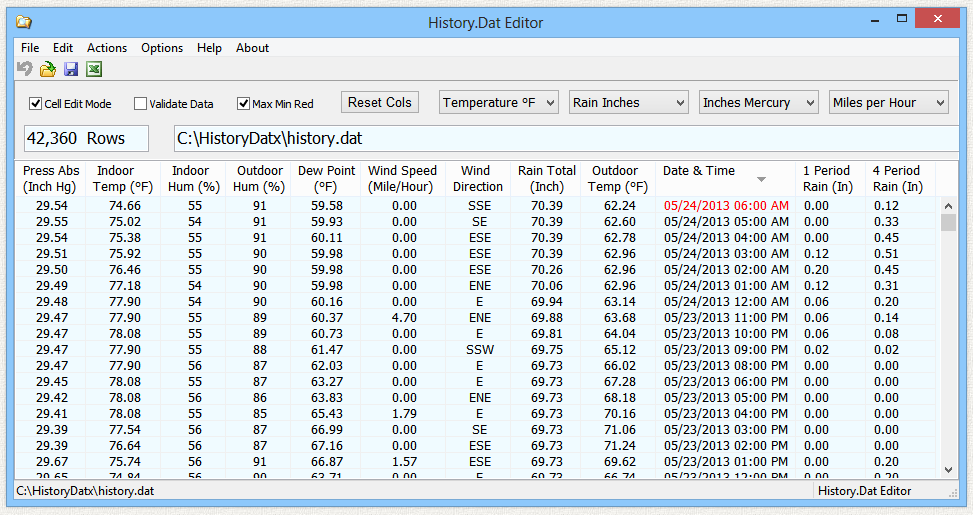
This program includes two columns on the right that you will not find anywhere else: 1 Period Rain and 4 Period Rain . The History.Dat file only shows the total accumulated rain. My program calculates and displays the difference between each reading so you can see recent rain activity. 4 Period Rain is the rain accumulated over the last 4 periods. If your data is hourly, it will be the rain over the last 4 hours.
This demo version has all functions except you cannot save the edited History.Dat file. There is no time limit. Evaluate the program and decide if you would like to purchase it for $20. If you do buy the program and are not happy with it for any reason, I will refund all your money with no questions asked. Purchase once and all future updates are free. It contains no nag screens, no spyware, no advertising.
Click the top of a column to sort the data by that column values. Click again to sort in the opposite direction. Files are saved in the displayed sort order.
Click the headings and drag the columns around to any order. Right-click on the headings to add or remove columns. Click the edge of a column and drag to adjust the width. Removed columns are made invisible and not included in the saved files. The column arrangement in the saved files is the same as shown on screen. The program saves and restores the column arrangement the next time it is run. Press the Reset Cols button to restore all columns to display all columns in original order shown above.
This is a 32-bit program and will run on Windows ME, NT, 2000, XP, Vista, Windows 7, 8, 10, and Windows 11. It also runs fine on 64-bit systems.
If you purchase the program for $20.00 (Twenty US Dollars) I will send you a serial number by email that will enable file save. You can pay by PayPal or mail a check. If you purchase this program and are not satisfied with it for any reason I will refund your money. Pay once and all future upgrades are free. Your serial number will work with all future versions. It contains no time limits, no nag screens, no spyware, and no advertising.
See your Home Weather Station Data in Real Time
Download
Info
Purchase
To use this program, you must have LaCross 2300 series Weather Station HARDWARE connected to your computer serial port.
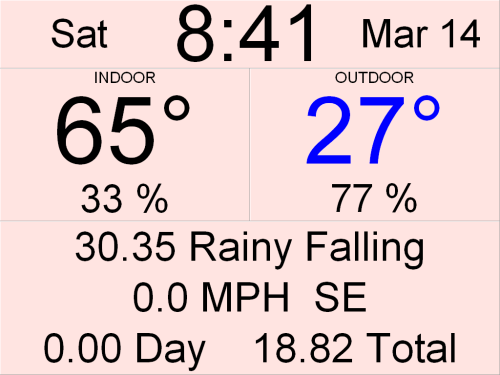
WS2300 ScreenSaver reads weather data from your LaCross 2300 series Weather Station and displays this data as a screensaver. It shows indoor and outdoor temperature and humidity, barometric pressure, wind speed and direction, and amount of rain. It also shows the time, date, and day of the week on the top line. Each of the data values can be turned on and off. For example, if you don't want to see rainfall then you can turn it off. All of the colors (both text and background) can be customized. It covers the entire screen including the task bar on the bottom. It has no frame so there are no borders. To exit the program just press any key, click the mouse, or move the mouse. It installs both as a normal program and a real screensaver with password ability and preview in the small Windows screensaver setup screen.
This is a 32-bit program and will run on Windows ME, NT, 2000, XP, Vista, Windows 7, 8, 10, and Windows 11. It also runs fine on 64-bit systems.
If you purchase the program for $30.00 (Thirty US Dollars) I will send you a serial number by email that will remove the nag screen that is displayed when the program exits. You can pay by PayPal or mail a check. If you purchase this program and are not satisfied with it for any reason, I will refund your money. Pay once and all future upgrades are free.
The program works fine even if you do not pay for it. There is no time limit. It will run forever. It is fully functional. No features have been removed. It contains no spyware, no advertising.
If you would like to purchase a program, or make a donation, use the link below. You can pay with a credit card or your PayPal account.

 Send Mike 10 Dollars
Or mail a personal check or money order payable to Michael Robinson:
Michael Robinson
PO Box 95
Shelton, CT 06484
 I am PayPal Verified. My Account Creation Date is May 30, 2000. Yes, I have been using this PayPal account for over TWENTY years.
The Official PayPal Verified Seal above means that I have provided PayPal with proof that I have a bank account and that my address is valid. Banks are required by law to screen account holders so PayPal's verification process increases security when you pay parties you do not know. My bank has my address and Social Security number on file. I have been using PayPal for over 20 years.
I use PayPal because the fees are low. If you send me $20.00 PayPal only takes about $1.00 so I net $19.00. All other payment services take several dollars so I would have to charge around $25 for my program to gain the same net. This lowers the cost to you. PayPal is usually free for most transactions, such as Ebay auction payments, but as a business I am required to have a Premier Account with fees. If you do not have a PayPal account, you can still use PayPal to make a payment using your credit card. PayPal does not charge you any fees for this. PayPal is a very secure and reliable payment system used by millions of people around the world.
| DONATION | HOME |
All web pages and graphics created and maintained by Michael Robinson.

elegantpie@hotmail.com
https://elegantpie.com